How to Remove Hacked Content from Google Search Results
Looking to remove hacked content from Google search results? Don’t worry, the team at WP Guard is here to help you out. We’re a WordPress security and maintenance team, and over the years we’ve seen how quickly a hack can spill beyond the site itself.
Google indexes injected spam pages quickly, surfacing them under the site’s own domain before the owner notices anything wrong. By the time the warning “This site may be hacked” appears alongside their listings, every potential visitor can already see the damage.
Most owners clean the site and assume that’s enough. However, what’s already sitting in Google’s index doesn’t disappear on its own, and this guide covers exactly how to clear it.
Why Does Hacked Content Show Up in Google Search Results?
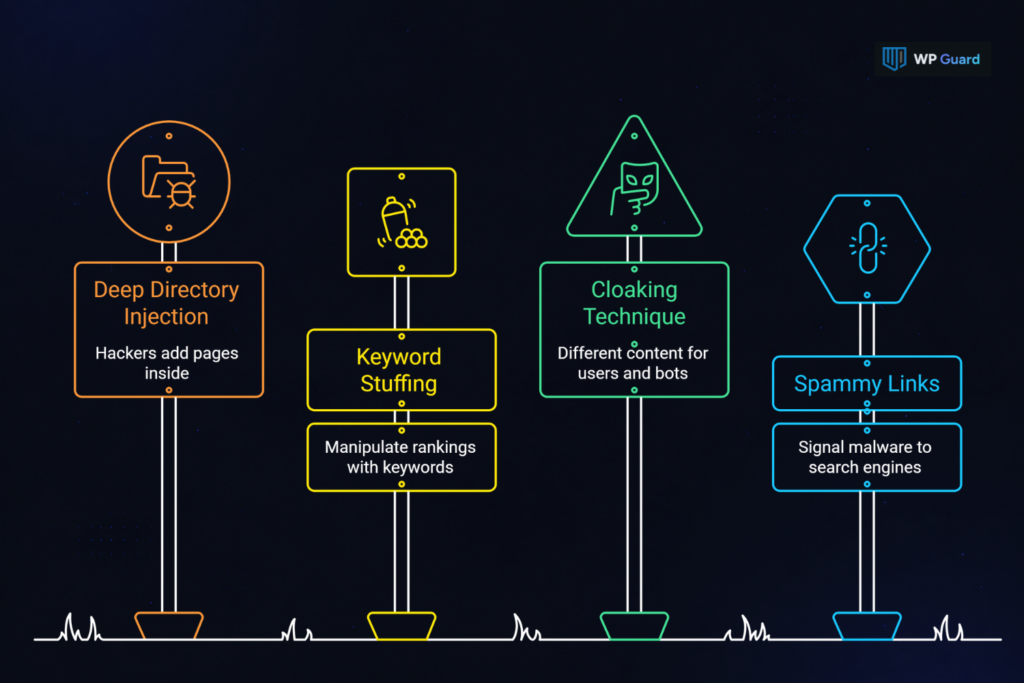
Hacked content shows up in search results because Googlebot crawls every accessible page on a site. That includes pages hackers add deep inside existing directories. It’s just a matter of time before those pages get indexed.
Think about it this way: hackers don’t always upload obvious content. They inject webpages packed with pharmaceutical keywords, foreign language text, or false information to manipulate search rankings for their own gain.
Some go even further with a technique called cloaking. When cloaking is active, the actual site looks normal to you, but Googlebot sees spammy content based on the user agent making the request. Malicious content moves through the server this way and gives crawlers a completely different picture of the site than the owner sees.
The harm happens in that gap between what crawlers see and what the owner sees. Spammy links tied to a legitimate domain signal to search engines that the site is hosting malware. At that point, Google can flag the entire domain within days of the hack.
How Do You Find Which Hacked Pages Google Has Already Indexed?
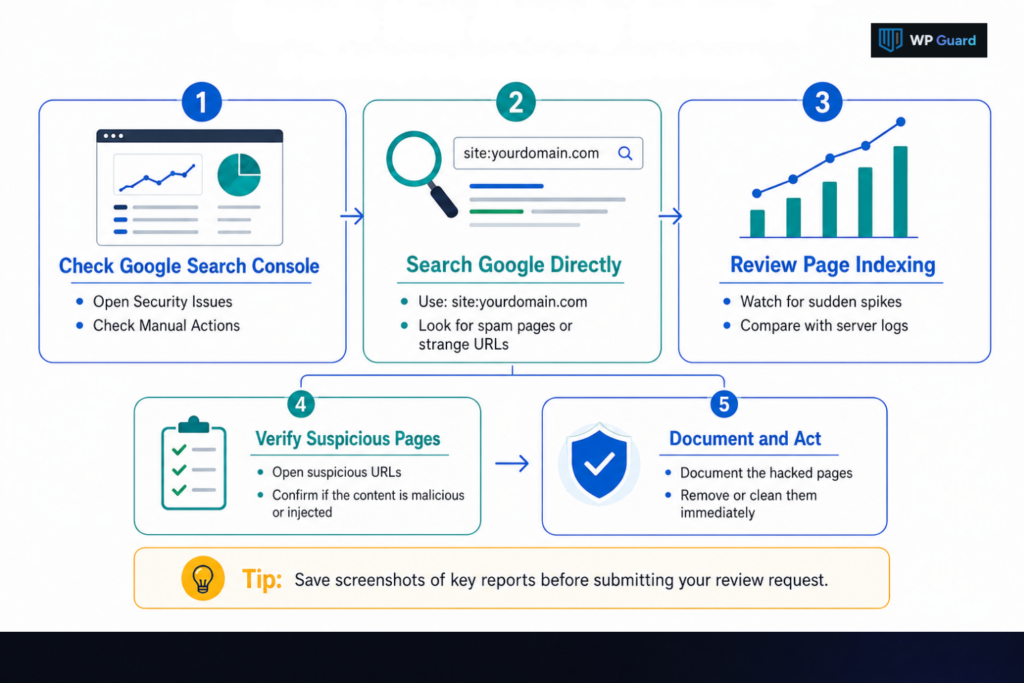
Start by opening Google Search Console (GSC). It gives you direct access to every security flag, indexed URL, and manual action tied to your site. Here’s what to look at:
The Security Issues Report Shows You Exactly What Google Flagged
Inside your GSC account, go to Security and Manual Actions → Security Issues. You’ll get every flagged URL with sample examples grouped by issue type:
- Hacked content
- Unwanted software
- Social engineering
- Deceptive pages
For manual actions, check the Manual Actions panel in the same dashboard.
We recommend saving a screenshot of both the Security Issues and Manual Actions panels. You’ll need that record when you submit your review request.
Search Google Directly to See What Hacked Pages Are Visible
Want to see what’s publicly visible? Type site:yourdomain.com into the search bar and scan for pages you don’t recognise. Spam pages typically show foreign language content, unrelated commercial links, or gibberish URLs that have nothing to do with your actual site.
To dig deeper, try adding a known spam keyword after the site operator. Something like site:yourdomain.com ‘buy cheap’ often surfaces hacked pages the Security Issues report missed.
Sudden Jumps in Indexed Pages Usually Mean Spam Was Injected
The Page Indexing report in GSC tells a different story than the Security Issues panel. A sharp spike in indexed pages that doesn’t match anything you published is a sign that someone added files to the server without authorization. Nine times out of ten, that’s exactly what a hack looks like from the inside.
From there, check your server access logs against that spike date to pinpoint when the breach happened. Then sort the URLs by date discovered to isolate the injected batch.
Clean Your Site Completely Before You Touch the Removal Tools
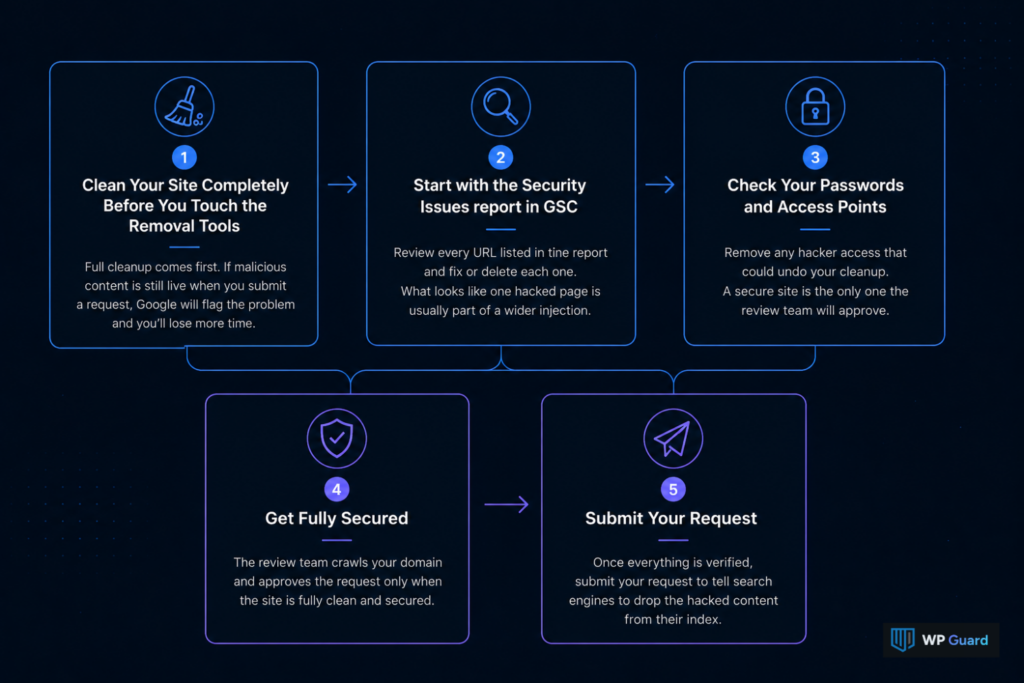
Whenever you find hacked content on your domain, full cleanup comes first. If you submit a request while malicious content is still live, Google crawls the page during review and flags the problem immediately. You’re back to square one and you’ve lost more time.
So start with the Security Issues report in GSC. You should go through every URL GSC listed in that panel and fix or delete each one before submitting anything. Hackers rarely limit themselves to one entry point, so what looks like a single compromised page is usually part of a wider injection.
Check your passwords and access points too, because a hacker who still has server access can undo your cleanup mid-review. At the end of the day, the review team crawls the domain and approves the request only when the site is fully secured.
Once you’ve verified everything, you’re ready to tell search engines to drop what’s sitting in their index.
How Do You Get Hacked URLs Removed from Google’s Index?
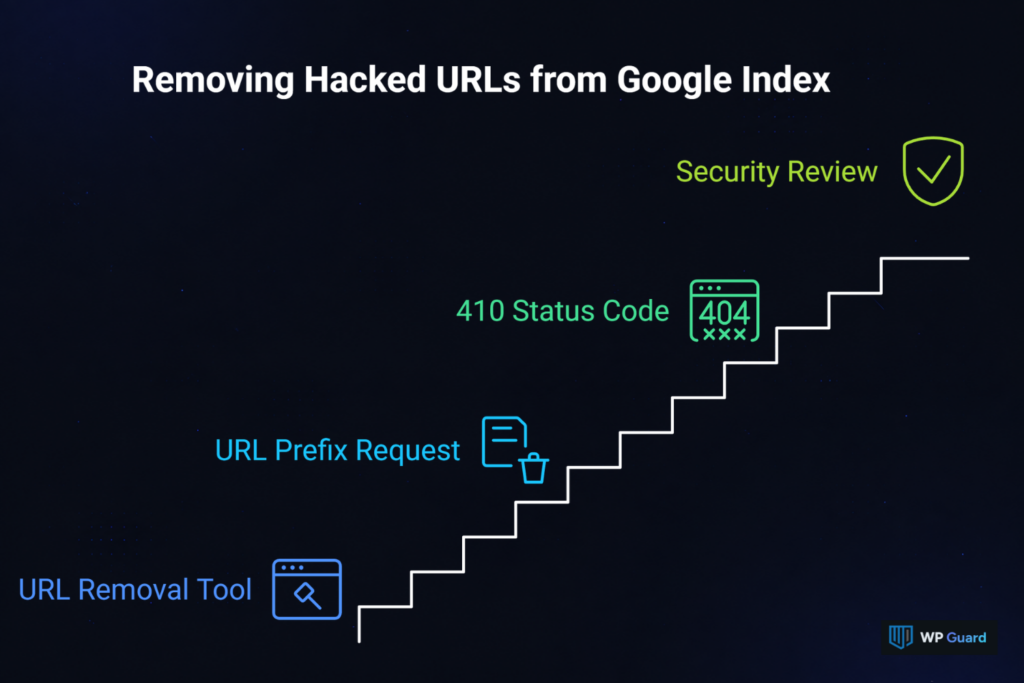
Google won’t automatically drop hacked URLs from its index just because you cleaned the site. You have to tell it they’re gone, and there are four ways to do that.
Each one serves a different situation, so let’s get into them one step at a time.
1. The URL Removal Tool Suppresses Hacked Pages
Start here for urgent cases. In your GSC account, go to Index → Removals → New Request, then submit the hacked URL. Once submitted, keep an eye on the request status directly in GSC to track when it goes through.
However, this is a temporary fix rather than a permanent one. The suppression lasts 90 days, and if that page hasn’t been properly blocked by then, the URL resurfaces in search results.
Suggestion: Use the Removals tool when a hacked page is actively damaging your SEO while the broader cleanup is still underway.
2. Use a URL Prefix Request to Remove Entire Spam Directories
Some hacks don’t inject one or two pages. Pharma hacks and Japanese keyword hacks, for example, generate hundreds of spam URLs grouped inside a single directory. For those, enter the directory path in the Removals tool rather than individual URLs, and GSC suppresses everything inside it at once.
Plus, delete the spam directory from the server and block it in robots.txt to make the removal stick permanently.
3. Set Deleted Hacked Pages to Return a 410
Once you delete a hacked page, configure it to return an HTTP 410 Gone status code.
A 410 tells Google the page no longer exists and speeds up deindexing. A 404 works the same way technically, but Google treats a 404 as “page missing for now,” whereas a 410 signals permanent removal.
From there, run a live test using the URL Inspection tool in GSC to verify the status code is active prior to submitting any review request (skip this and Google’s reviewer will find the problem before you do).
4. A Security Review Is the Step That Lifts Google’s Manual Action
Getting URLs out of the index handles the visible symptoms. The security review goes deeper and lifts the manual action Google applied to the site.
So to kick that off, go to Security Issues in GSC, expand the flagged item, and click Request Review. In the reconsideration request, describe what the hacker changed, what you found across the site’s files and webpages, and every fix you applied.
Google’s webspam team reviews this manually, which is why it takes longer than a standard submission. If the review comes back rejected, Google sends feedback pointing to specific remaining hacked content. That gives you a second chance to fix and resubmit.
Now that everything is submitted, the natural next question is how long you’ll actually be waiting.
How Long Does Google Take to Remove Hacked Content?
Timeline depends on which step you’re waiting on, and each stage has a different typical timeframe.
The table below shows what to expect at each step:
| Action | Typical Timeframe |
| URL Removal Tool request | A few hours to one day |
| Security review decision | A few days to a few weeks |
| Auto manual action removal | Varies, no submission needed |
| Safe Browsing warning lifted | A few days after review approval |
The process slows down when the hack spreads particularly wide or when the reconsideration request lacks enough detail (and in the worst cases, we’ve seen security reviews stretch past three weeks).
Remember: Google’s clearance only covers its own results. Other search engines like Bing maintain their own indexes, so hacked content may still appear on those platforms. You’ll need to submit requests through their respective webmaster tools to get full coverage across all platforms.
What Changes in Google Search Once Your Site Passes the Security Review?
Potential visitors will notice the ”This site may be hacked” warning disappear from your listings first. From that point, your site appears normally in search. As that happens, click-through rates can start recovering.
That said, rankings don’t bounce back overnight. Search engines need time to recrawl and reassess every cleaned page before SEO performance moves in the right direction (patience is part of the process here).
In the long run, the bigger concern is preventing a repeat incident. Sites we’ve helped recover often find that without continuous monitoring, a second breach goes unnoticed just as long as the first one did.
And if you want to avoid going through all of this again, WP Guard monitors your WordPress site around the clock. Our team flags suspicious activity and access attempts the moment they appear, so you’re not discovering the problem through a Google warning in your listings.
Don’t Let This Happen Again
The cleanup process has two parts: malicious content off the website, and those pages out of GSC. Most site owners only handle one of them. If you skip either half, you expose your site to risk and damage your search presence.
Fortunately, Google gives you the resources to handle both. The URL Removal Tool, the Security Issues report, and the review request process are all free and accessible to any verified website owner. When you work through them in the right order, the path forward is clear.
That said, none of this addresses how the hack happened in the first place. If the vulnerability that let someone into your web files is still there, you could be dealing with a second infection within days. So remove the hacked content, lock down the site, and submit the review.
And if you want a team handling WordPress security from the ground up, WP Guard is here for that. Get in touch, and our team will assess your site and handle the cleanup from the ground up.
FAQs:
We’ve gathered the questions site owners ask most during the Google removal and recovery process, and answered each below:
Can a Hack Damage a Site’s Reputation Even After the Content Is Removed?
Yes. Negative search results tied to a hacked domain can linger in user memory and third-party caches even after Google clears them. That said, rebuilding trust with potential visitors takes time, and some browsers may still show cached warnings for days after the review approval.
Can Google Remove Results That Contain My Personal Information If My Site Was Hacked?
If a hacker used your site to post personal information about you or your customers, you can request removal directly through Google’s personal content removal form. From there, complete the form with the relevant URLs. The platform will then review whether the content qualifies under its policies.
Does a Website Owner Need a Google Account to Request Removal?
Yes. To submit a request through Google Search Console, you need a Google account and verified ownership of the domain. Without verification, you won’t have control over the Security Issues report or access to the Removals tool.
Will Hacked Content Still Appear on My Computer After Google Removes It?
Possibly. Your browser stores cached versions of pages locally, so hacked content may still appear on your computer even after Google drops it from search engine results pages. However, you can fix this by clearing your browser cache and cookies. The issue typically disappears on its own within a few days either way.
Can I Contact Google Directly to Speed Up the Removal Process?
Google doesn’t offer direct contact for individual requests. The fastest path is submitting a thorough reconsideration request through Search Console. Monitor the news feed in your GSC account for any review updates or feedback from the webspam team.