How to Fix a WordPress Redirect Hack
You can fix a WordPress redirect hack by removing malicious code, restoring clean files, and closing the security gap that allowed the attack. This hack injects unwanted code into your site and silently sends your visitors to spam, scam, or phishing pages without any warning on your end. It’s built to stay invisible to you while doing the damage.
We’ve seen this exact scenario play out across hundreds of sites at WP Guard, which is why we put this guide together. Here, you’ll learn how to:
- Spot a redirect hack
- Find every place the malicious code hides
- Remove it without leaving a backdoor open for round two
So pull up your WordPress dashboard and let’s get into it.
What Is a WordPress Redirect Hack?
In a WordPress redirect hack, attackers insert malicious code into your site’s files or database.
But the worst part is that your WordPress website keeps running without any visible signs of trouble. By the time you find out, the damage to your search engine rankings and site’s reputation is already done.
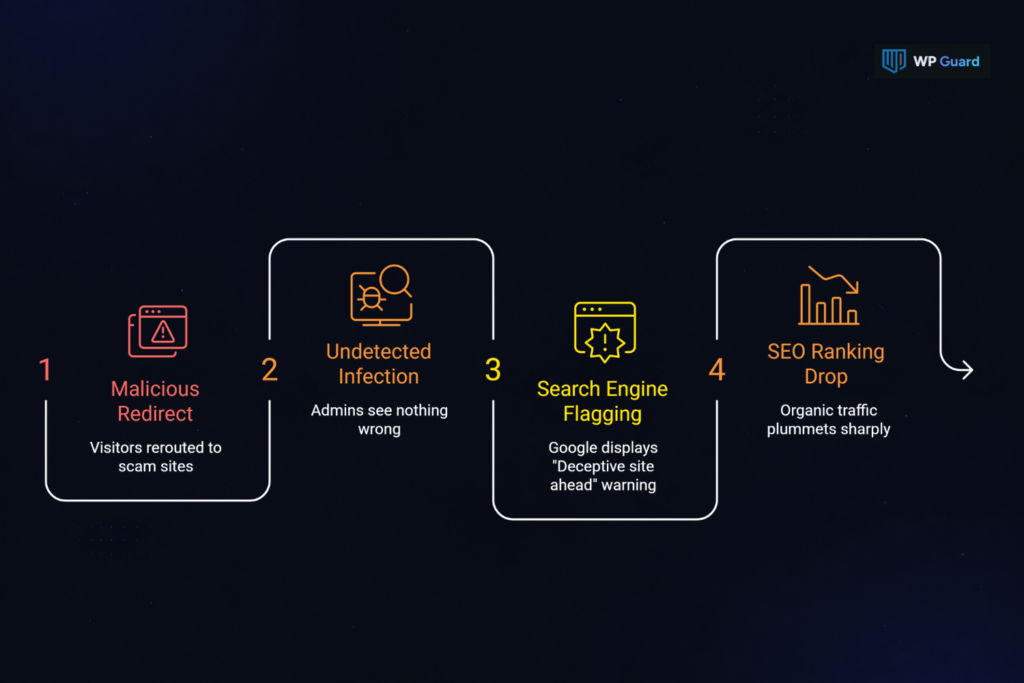
Here’s how a redirect hack damages your site in five ways:
- Visitors Get Sent Elsewhere: Malicious code reroutes first-time visitors to scam sites or spam sites the second they land. Which means your actual content never even loads for them.
- Admins See Nothing Wrong: Because the redirect targets only logged-out visitors, site administrators get the normal site on every check. As a result, the infection runs undetected for days or even weeks.
- Google Flags Your Site: Search engines detect the malicious redirects and display a “Deceptive site ahead” warning across Chrome, Firefox, and Safari. Naturally, this warning will stop visitors from accessing your pages.
- SEO Rankings Quickly Drop: You’ll notice organic search traffic drop sharply before anything else. A blacklist warning wipes out the vast majority of Google search visibility within 24 hours of going active.
- Reinfection Is the Default: Most redirect hacks plant backdoors across multiple locations. If you miss one, the redirect attack will relaunch. In fact, a missed backdoor can rebuild the entire infection within hours.
Redirect hacks can spread through different parts of a WordPress site, like modified files or injected database entries. Finding the source of the redirect is the first step to removing the infection and preventing it from returning.
Where Does WordPress Redirect Malware Hide on Your Site?
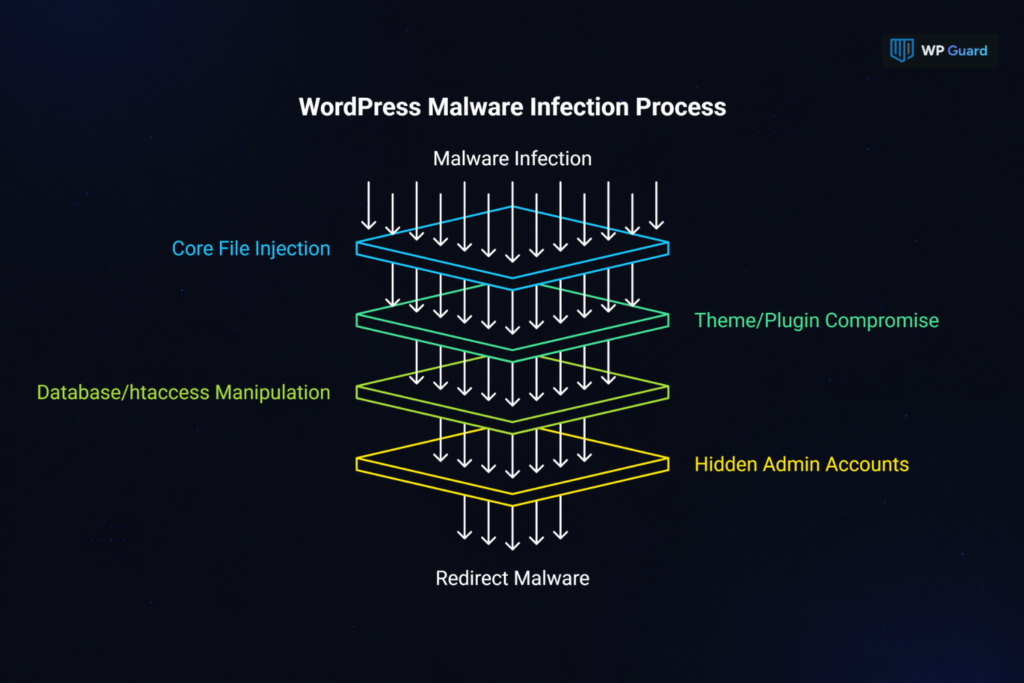
Redirect malware spreads itself across multiple locations on purpose. Attackers know that a site owner who only cleans one spot will be right back where they started within hours. They keep an eye on every corner of your WordPress site, and plant redirect code in places most people never think to check.
Below you’ll see a breakdown of every location redirect malware uses to stay alive on your site.
Core WordPress Files and wp-config.php
Attackers tend to inject eval() and base64_decode() strings directly into wp-config.php to run redirect code on every single page load. These two PHP functions allow attackers to conceal what their scripts are doing.
Core WordPress files like wp-blog-header.php and wp-load.php are also common targets, since both load early in the WordPress startup sequence. These modified files may look legitimate at a glance. But that’s exactly what makes unauthorized code so easy to miss without a line-by-line check of your core WordPress files and PHP scripts.
Your Active Themes and Plugins
Ever reinstalled a plugin and wondered why the redirect came straight back? Well, theme and plugin files are the most common hiding spots for obfuscated redirect code. Especially the active theme’s header.php and functions.php run on every page request, so redirect scripts injected there fire constantly.
Beyond active theme files, attackers drop fake plugins into directories with names like wp-performance-optimizer or cache-manager-plus.
Nulled or pirated plugins carry this risk even more. Obfuscated code using str_rot13() or gzinflate() hides inside these themes and plugins. And it makes the infection look like custom code at first glance.
The Database and .htaccess File
From what we’ve seen cleaning up infected WordPress sites, the database and .htaccess file are usually what trip people up every single time.
Among them, the .htaccess file is a common injection point. It uses RewriteCond and RewriteRule directives to target visitors arriving from search engines. Separately, malicious JavaScript strings land directly in wp_posts or wp_options, and point traffic to external domains.
Attackers also manipulate the server configuration by changing site URL and home values in wp_options. They often create hidden admin accounts in wp_users to hold access even after the infected files are cleaned.
How to Tell If Your WordPress Website Is Infected
You might think that you’ve checked your site and everything looked fine. Unfortunately, that doesn’t mean visitors aren’t still being redirected. A little test can reveal the way the malware sees your site.
- Log out and visit your WordPress site in an incognito window
- Test from mobile devices on a separate network too
- Then check Google Search Console under Security Issues
And if you see warnings there, that’s your confirmation.
A WordPress redirect can slip through the cracks precisely because it’s built to dodge site administrators. Checking these hidden areas helps reveal changes that normal website checks often miss.
How Do You Fix WordPress Redirect Hacks?
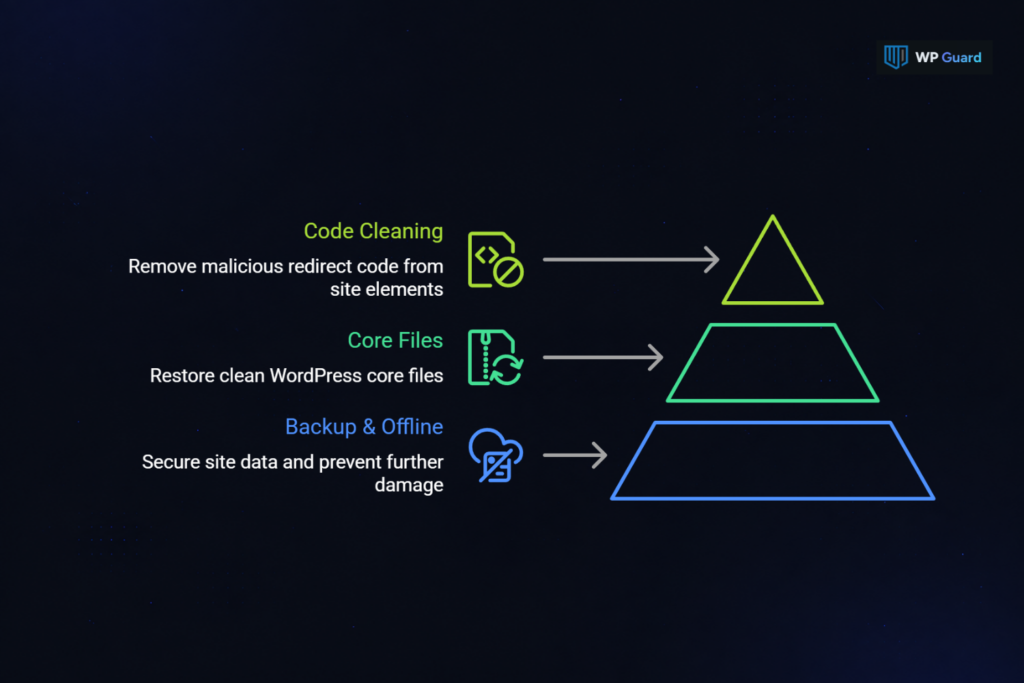
Fixing a WordPress redirect hack involves working through three steps in order: back up and go offline, replace core files, then clean themes, plugins, and the database. Skipping any one of them will leave the door open for reinfection. And with WordPress redirect malware, even a single missed file is enough to bring the whole thing back.
Take a look at how to work through each step of the fix without leaving anything behind:
Back Up the Site and Take It Offline
Taking the site offline before touching anything protects your visitors from harm. Plus, it gives you a clean forensic record to work from if the infection turns out to be deeper than expected.
When fixing hacked websites for our clients, we often see that their instinct is to start deleting files immediately. At that time, we explain to them how a full backup of the hacked website comes first. Your hosting provider likely has one, though it may already be infected.
In that scenario, you can create a fresh one manually before touching anything. Then put the WordPress site offline using maintenance mode. From there, reset your:
- WordPress admin password
- Database password
- All FTP (File Transfer Protocol) credentials
It’s important to complete this step before any file changes begin in your WordPress installation.
Replace Infected WordPress Core Files
Replacing WordPress core files with a fresh download is the fastest way to remove injected redirect code from the files WordPress loads on every single page request.
For that, download a clean copy of WordPress from the WordPress repository that matches your current version exactly. Then replace all core WordPress files via FTP. Leave wp-content and wp-config.php untouched during that first upload.
After that, open wp-config.php manually and go through it line by line. Here, look for eval(), base64_decode(), or any unfamiliar include statements buried in the file (a step most cleanup guides mention last, if at all). These are the modified files that carry hidden code most site owners completely miss.
Clean Redirect Code From Themes, Plugins, and the Database
With core files replaced, the remaining infection almost always lives across three places: your theme files, your plugin directories, and the database.
Time and again, we’ve seen site owners try to patch things up by cleaning individual plugin files manually, and it brings the WordPress redirect malware back every time.
What you really need to do is reinstall all the plugins directly from the WordPress repository instead. Then replace active theme files with clean copies and search functions.php and header.php for obfuscated redirect code or injected JavaScript.
For the database, search wp_posts and wp_options for base64 strings, malicious links, or references to external domains. Along with that, delete any PHP files or scripts found in the uploads directory. That folder should never hold executable WordPress files.
What Should You Do Right After Cleaning?
After cleaning a hacked WordPress site, you should secure access, update software, and monitor for any signs of the redirect returning. Otherwise, it leaves the same entry point open that attackers used the first time. And automated bots will find it again before you even notice.
Our expert developers recommend following through each of these steps on your WordPress website before bringing it back online:
| Action | Why It’s Important | Where to Do It |
| Update all plugins and themes | Outdated plugins are the most exploited entry point for future attacks | WordPress dashboard > Updates |
| Remove unused plugins and themes | Inactive installs are still exploitable even when deactivated | Dashboard > Plugins / Themes |
| Set correct file permissions | Stops PHP scripts from running in directories like the uploads directory | Via FTP or hosting file manager |
| Disable file editing in WordPress admin | Blocks attackers from modifying WordPress files through the dashboard | Add define(‘DISALLOW_FILE_EDIT’, true) to wp-config.php |
| Enable two-factor authentication | Cuts off credential-based reinfection even if an attacker leaks your passwords | User settings or a security plugin |
| Submit reconsideration request to Google | Lifts the “Deceptive site ahead” warning from Google search results after a confirmed clean | Google Search Console > Security Issues |
Many site owners treat these steps as optional. But a web application firewall, updated plugins and themes, and correct file permissions are what separate a one-time cleanup from a repeat attack.
Other security plugins won’t get ahead of it either if the original vulnerability stays open. So before your WordPress website goes live again, it’s important to tick every row. Your organic search traffic and Google search standing both depend on it. And so does protection against future threats.
How Do You Stop the Redirect From Coming Back?
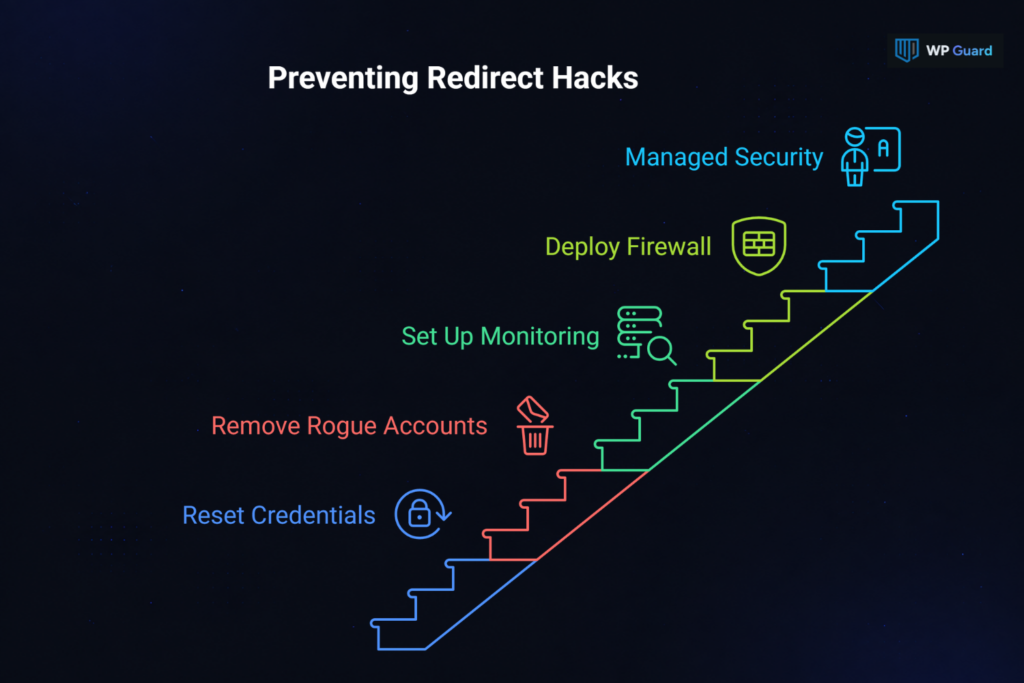
Getting through a redirect hack cleanup is one thing. But keeping it from happening again is where most site owners lose ground, and it’s usually for the same two reasons. They either don’t audit what the attacker left behind, or they don’t put anything in place to catch the next redirect attack before it lands.
Both of those gaps are fixable, and here’s how you can close them.
Reset All Credentials and Remove Rogue Admin Accounts
Even with every malicious file gone, attackers can regain access through exposed credentials or hidden admin accounts left behind during the infection.
So start by auditing wp_users for any admin accounts your team didn’t create. Then revoke any API keys (Application Programming Interface) or connected service tokens that were active while the hacked website was compromised.
Finally, generate new WordPress security keys in wp-config.php to invalidate every active session tied to the old credentials (expired sessions mean invalid access for everyone, including the attacker). That’s how you cut off access at the root, instead of just at the surface.
Set Up Monitoring Before the Next Attack Finds You
The sites that don’t get reinfected aren’t lucky. They have server-level scanning and a consistent update schedule working in the background before any attacker gets a foothold.
Here’s the thing: redirect malware can tamper with a security plugin running inside WordPress. And that allows the infection to hide from scans, block detection features, or prevent the plugin from working properly.
Meanwhile, server-level scanning sits below the WordPress environment entirely, so that infection can’t touch it. On top of that, outdated plugins are still the number one entry point for a redirect hack across the WordPress ecosystem.
In this case, a web application firewall such as Cloudflare WAF, Sucuri Firewall, and Wordfence Firewall can block known redirect attack patterns before they reach your site. A managed website security service will handle the rest. It’ll monitor search engine crawlers and flag unauthorized user accounts the moment they appear.
Don’t Let the Same Redirect Hack Hit Twice
A WordPress redirect hack isn’t a one-time problem you fix and move on from. It comes back when the cleanup is incomplete, credentials stay unchanged, and outdated plugins sit untouched. Every step in this guide exists for that reason.
So go back through the checklist. Replace the core WordPress files, scrub the database, reset every password, and lock down your WordPress site before it goes live again. Don’t skip the hardening steps because the fix felt thorough.
If this guide helped you fix a WordPress redirect hack, there’s a lot more where that came from. At WP Guard, we write about website security, WordPress hack recovery, and everything in between. Browse our other articles and stay a step ahead of future attacks.
Frequently Asked Questions About WP Redirect Hacks
These are the questions we hear most often from WordPress site owners dealing with a redirect attack. The answers below cut straight to what you need to know.
Can a WordPress Redirect Hack Come Back After Cleaning?
Yes, a WordPress redirect comes back when even one backdoor survives the cleanup. Redirect malware doesn’t live in a single file, after all. It spreads across your WordPress core, theme files, and database. When you miss any one of those, the redirect scripts rebuild the infection within hours.
Does a Redirect Hack Always Show Up in Google Search Console?
Not always. Google search picks up on a redirect hack only when its crawlers activate the redirect. Conditional attacks that target only mobile users or specific search engine traffic can stay off Google Search Console for days. So a clean security report there isn’t a guarantee your site is actually clean.
How Does Redirect Malware Get Into a WordPress Site?
Outdated plugins are the most common entry point by a wide margin. That’s why automated bots scan the WordPress environment constantly for plugins with known vulnerabilities.
They don’t need custom code or sophisticated redirect scripts to get in. Just a single unpatched plugin hands them everything they need to inject malicious scripts and take over hacked sites.